Cleaned out the blog, after abandoning it for almost half a year (busy times).
I've been experimenting with procedural architecture generation lately, usually these systems follow a grid based layout, where you fill an array to calculate tiles.
However, i needed more precision for what i was trying to do, and the ability for angles and circular layouts, so i ended up trying a different route storing only edge points in space.
This lead to some problems, one was that i needed a way to quickly figure out if a point is inside a volume (to say, avoid placing a chest inside a wall).
Checking the collider bounds through physics wasn't an option, since this was needed to be done long before constructing actual geometry.
 |
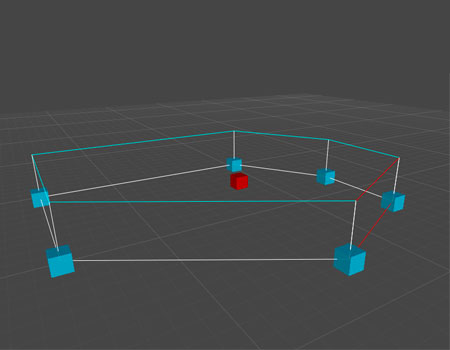
| Telling quickly if a point is inside or outside a shape. |
So here is the simple solution i ended up with, for anyone else who might be struggling with this.
It's based on the
Point in polygon algorithm (also some more information on it
here), which works by projecting a ray through the polygon counting the intersection points.
With the ray starting at 0, entering (first intersection) will turn it to 1, leaving to 2, entering again 3, leaving again 4... making it very easy to tell if the point is inside or outside, simply by checking if it results in an even or odd number of intersections.
    // this works on a flat plane, ignoring position in y
    bool PointInVolume(Vector3 point, Vector3[] arr)
    {
        var oddOrEven = false;
        var x = point.x;
        var z = point.z;
        float pointCurrX, pointCurrZ, pointLastX, pointLastZ;

        var pointsInVolume = arr.Length;
        var j = pointsInVolume - 1;

        for (int i = 0; i < pointsInVolume; i++)
        {
            pointCurrX = arr[i].x;
            pointCurrZ = arr[i].z;
            pointLastX = arr[j].x;
            pointLastZ = arr[j].z;

            if ((pointCurrZ < z && pointLastZ >= z || pointLastZ < z && pointCurrZ >= z) &&
                (pointCurrX <= x || pointLastX <= x ))
                if (pointCurrX + (z - pointCurrZ) / (pointLastZ - pointCurrZ) * (pointLastX - pointCurrX) < x)
                    oddOrEven =! oddOrEven;

            j = i;
        }
        return oddOrEven;
    }
After the testing worked, i ended up adding a simple overload for calculating the volume around the point, so i could send in the size of the object as well, making sure it fits (keep in mind this works with a rectangular shape, for complex shapes it needs to be adjusted.)
    // looking for a volume at a centerpoint (point), width and height
    bool PointInVolume(Vector3 point, Vector3[] arr, float width, float height)
    {
        var hX = width / 2;
        var hY = height / 2;
        var widthMax = point.x + hX;
        var widthMin = point.x - hX;
        var heightMin = point.z + hY;
        var heightMax = point.z - hY;
        var topR = new Vector3(widthMax, point.y, heightMax);
        var topL = new Vector3(widthMin, point.y, heightMax);
        var btmR = new Vector3(widthMax, point.y, heightMin);
        var btmL = new Vector3(widthMin, point.y, heightMin);

        if (PointInVolume(point, arr) &&
            PointInVolume(topR, arr) &&
            PointInVolume(topL, arr) &&
            PointInVolume(btmR, arr) &&
            PointInVolume(btmL, arr))
            return true;
        else
            return false;
    }